Integrating 3D Digital Paper Design into Professional Creative Workflows
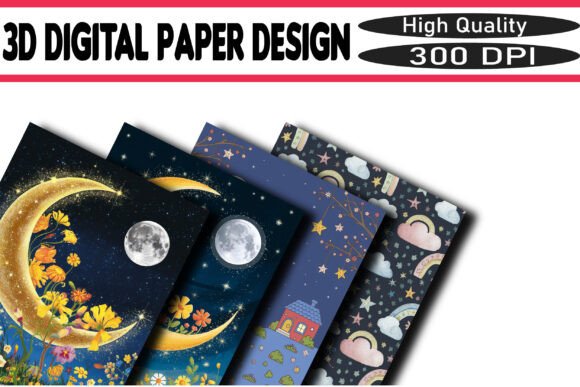
In the evolving landscape of digital content creation, texture and depth have become critical differentiators. 3D Digital Paper Design represents a significant shift from flat, two-dimensional assets to rich, tactile visuals that mimic the physical properties of high-quality stationery. For professionals ranging from graphic designers and marketers to small business owners and educators, understanding how to leverage these assets is no longer just an aesthetic choice—it is a strategic component of brand consistency and audience engagement.
This approach to design does not exist in a vacuum. It interacts with various stages of a project lifecycle, from initial concept development to final output for print or digital distribution. By incorporating sparkling textures, holographic finishes, and realistic paper grains, creators can elevate standard deliverables such as invitations, social media graphics, and print-on-demand products. The key lies not merely in selecting a pretty background, but in integrating these elements seamlessly into a broader workflow that prioritizes efficiency, resolution quality, and compatibility across platforms.
The Role of Texture in Modern Visual Communication
Visual communication relies heavily on subconscious cues. When a viewer encounters a digital image that simulates the look of fine glitter, chunky embossing, or ombré gradients, their brain processes it with a sense of tangibility. This phenomenon is particularly valuable in industries where trust and perceived value are paramount. For entrepreneurs launching a new product line or marketers crafting campaign assets, 3D Digital Paper Design serves as a bridge between the digital screen and physical expectation.
Consider the process of creating digital invitations or greeting cards. A flat color background often feels sterile and mass-produced. In contrast, a high-resolution background featuring fine glitter or holographic shifts adds a layer of sophistication and care. This attention to detail signals to the recipient that the event or message is special. Similarly, in the realm of scrapbooking and journaling apps, users seek authenticity. They want their digital layouts to resemble the cherished physical albums of the past. By utilizing assets that offer crisp, print-ready results at 300 DPI, designers can meet this demand for nostalgia while maintaining the convenience of digital editing.
Strategic Integration Across Project Phases
To maximize the utility of these design elements, it is helpful to view them as modular components within a larger production pipeline. Their application varies depending on whether you are in the planning, execution, or refinement stage of a project.
Pre-Production and Asset Selection
Before opening any design software, successful implementation begins with organization. A well-curated library of glitter textures and paper backgrounds saves considerable time during tight deadlines. When sourcing these materials, prioritize collections that offer variety in style—such as fine glitter for subtle elegance, chunky textures for bold statements, and ombré effects for dynamic movement. Ensuring that these files are available in both JPEG and PNG formats provides flexibility. PNGs with transparency are essential for layering effects without obstructing underlying text or images, while high-quality JPEGs are ideal for full-background coverage.
Compatibility is another crucial factor during this phase. Verify that the resolution meets the requirements of your intended output. For digital-only use, such as social media posts, standard web resolutions may suffice. However, for sublimation printing, stickers, or physical invitations, 300 DPI is non-negotiable. Starting with high-resolution assets prevents pixelation and ensures that the final product maintains its professional integrity regardless of the medium.
Execution and Layering Techniques
During the design phase, the interaction between 3D Digital Paper Design and other visual elements determines the overall impact. These textures should support, not overpower, the primary message. For instance, when designing branding materials or social media graphics, use seamless textures as a base layer. This allows for effortless tiling and ensures that the background remains consistent even if the canvas size changes.
Layering is where the magic happens. Combine a holographic paper texture with semi-transparent shapes to create depth. Use blending modes in your design software to integrate the sparkle naturally with typography. If you are working on planners or journals, consider how the texture interacts with functional elements like grids, lines, or icons. The goal is to enhance readability and usability while adding visual interest. Practical implementation involves testing different opacity levels and overlay effects to find the right balance between glamour and clarity.
Post-Production and Quality Control
Once the design is assembled, the focus shifts to quality control. Examine the output at 100% zoom to check for artifacts or banding, especially in gradient-heavy designs like ombré glitter. Ensure that colors remain vibrant and true to the original asset. For print-on-demand (POD) designs, it is advisable to order a proof before committing to a large batch. This step verifies that the digital sparkle translates effectively to physical materials, which can vary significantly depending on the substrate and printing method used.
Practical Applications for Diverse Professionals
The versatility of 3D Digital Paper Design makes it applicable across a wide spectrum of professional and personal projects. Understanding specific use cases helps in tailoring the design approach to meet distinct objectives.
- Invitations and Greeting Cards: Here, the emotional resonance is key. Use fine glitter textures for weddings or formal events to convey elegance. For birthdays or casual gatherings, chunky glitter and bright colors can evoke joy and excitement. The tactile illusion encourages recipients to engage more deeply with the invitation.
- Sublimation and Print-on-Demand: Entrepreneurs selling custom mugs, tote bags, or apparel need designs that stand out in crowded marketplaces. Holographic and sparkling textures add a premium feel to products, allowing sellers to command higher price points. Ensure that the design file is mirrored correctly for sublimation and that the background is seamless to avoid visible edges on curved surfaces.
- Digital Planning and Journaling: With the rise of tablets and stylus-based note-taking, digital planners have become a lucrative niche. Incorporating paper textures creates a familiar writing environment for users. Seamless patterns are particularly useful here, as they allow for infinite scrolling pages without visible breaks. Consistency in texture style across monthly spreads enhances the user experience and brand identity.
- Social Media Branding: In the fast-paced world of Instagram and Pinterest, visual consistency builds recognition. Using a signature set of glitter textures or paper backgrounds across posts creates a cohesive feed. These assets can serve as templates for quotes, announcements, or product showcases, streamlining the content creation process while maintaining a polished look.
Optimizing Workflow Efficiency
Integrating these assets into your routine requires a systematic approach to file management and tool usage. Create a standardized folder structure that categorizes textures by type (e.g., fine, chunky, holographic) and color palette. This reduces search time and allows for quicker experimentation during the creative process.
Furthermore, leverage the power of templates. Save common layouts—such as square social media posts, vertical stories, or standard invitation sizes—with your preferred 3D Digital Paper Design backgrounds already in place. This pre-configuration allows you to drop in new text and images rapidly, ensuring that every piece of content adheres to your quality standards without starting from scratch each time.
It is also important to stay updated with design trends while maintaining a core library of timeless textures. While holographic effects may peak in popularity, classic fine glitter and neutral paper tones remain evergreen. Balancing trendy elements with foundational assets ensures that your design toolkit remains relevant and versatile over the long term.
Conclusion: Elevating Standards Through Detail
The adoption of 3D Digital Paper Design is more than a trend; it is a reflection of the increasing demand for high-quality, tactile experiences in a digital world. By understanding how to select, integrate, and optimize these sparkling textures, professionals can enhance their creative output significantly. Whether you are designing a single invitation or building a comprehensive brand identity, the careful application of these assets adds depth, glamour, and professionalism.
Success in this area depends on preparation, attention to technical details like resolution and format, and a clear understanding of your audience’s expectations. By treating these digital backgrounds as essential tools rather than afterthoughts, you streamline your workflow and elevate the perceived value of your work. Start experimenting with these dazzling textures today, and observe how they transform your creative projects from ordinary to extraordinary.