Mastering the 3D Christmas Dinosaur Laser File for Festive Creations
The holiday season often brings a rush of creative pressure, especially for makers who want to stand out in a saturated market of generic ornaments and signs. Integrating a 3D Christmas Dinosaur Laser File into your workflow offers a unique solution that blends prehistoric charm with festive cheer. However, simply downloading a file is not enough to guarantee professional results. Many creators overlook the technical nuances of relief carving, leading to flat, unimpressive outputs or wasted material. Understanding how to properly utilize these specialized assets can transform your laser engraving or CNC projects from amateur attempts into polished, sellable products.
Understanding the Difference Between Standard and Relief Files
A common misconception among beginners is that any high-resolution image can be converted into a 3D carve. This is rarely true for complex subjects like dinosaurs wearing Santa hats. A standard vector or binary black-and-white file lacks the depth information required for a true three-dimensional effect. When you use a dedicated grayscale relief map, you are providing the machine with specific instructions on how deep to cut at every pixel. Lighter areas remain high, while darker areas are carved deeper. Without this precise data, your dinosaur will look like a flat silhouette rather than a textured, dimensional piece of art.
To avoid this pitfall, always verify that your bundle includes both color PNGs for mockups and corresponding grayscale depth maps. The collection featuring thirty high-resolution files ensures you have the correct format for various software platforms, including Glowforge, xTool, and LightBurn. Using a non-transparent PNG specifically designed for relief carving saves hours of manual editing and prevents the frustration of achieving inconsistent depths across your project.
The Critical Role of Resolution in Large-Scale Projects
One of the most frequent mistakes creators make is underestimating the importance of file resolution. When scaling a design for a large wall hanging or a substantial gift sign, low-resolution images become pixelated. These pixels translate directly into jagged, uneven cuts on wood, slate, or acrylic. A file that looks crisp on a computer screen may fail dramatically when expanded to twelve inches or more.
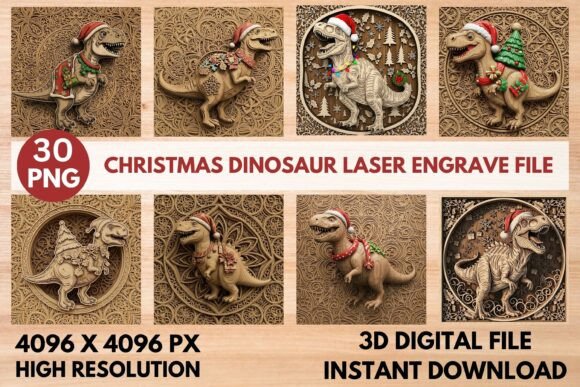
For professional-grade results, you need files that maintain integrity at scale. The ideal specification is a massive 4096 x 4096 PX resolution. This density ensures that even intricate details, such as the scales on a T-Rex or the delicate branches of a background Christmas tree, remain smooth and defined. Before purchasing or downloading any asset, check the pixel dimensions. If the file is smaller than 3000 pixels on its shortest side, it may not be suitable for larger CNC router projects or detailed laser engraving on dense hardwoods.
Material Selection and Machine Compatibility
Another overlooked aspect is matching the file type to your specific material and machine capabilities. While a 3D Christmas Dinosaur Laser File is versatile, it behaves differently on slate compared to basswood. Slate requires careful power settings to achieve the grayscale depth without cracking, whereas wood allows for more aggressive carving to highlight the texture. Beginners often apply the same settings used for vector cutting to relief engraving, resulting in burnt edges or insufficient depth.
To mitigate this, start with test pieces using the provided grayscale maps. Adjust your speed and power to find the sweet spot where the darkest blacks carve deeply without charring the surrounding lighter areas. Remember that these files are optimized for universal compatibility, but your machine’s lens quality and bed stability play significant roles. If you are using a diode laser, you may need multiple passes to achieve the same depth a CO2 laser or CNC router can accomplish in a single pass. Patience and iterative testing are essential for mastering the 3D effect.
Avoiding Design Clutter and Maintaining Focus
In the excitement of combining dinosaurs with holiday themes, there is a tendency to choose designs that are overly busy. A file featuring a dinosaur surrounded by intricate mandala-style carvings, snowflakes, and Christmas trees can easily become visual noise if not executed correctly. When too many elements compete for attention, the main subject—the adorable dinosaur in its Santa hat—loses impact. This is particularly problematic when engraving on dark materials where contrast is already limited.
A better approach is to select designs with clear focal points. Use the full-color PNGs included in the bundle to visualize the final product before committing to the carve. If the background elements are too dense, consider masking off certain areas during the engraving process or choosing a simpler variant from the fifteen unique designs available. Balance is key; the festive attire and holiday backgrounds should complement the dinosaur, not overwhelm it. This attention to compositional balance elevates your work from a novelty item to a sophisticated piece of decor.
Maximizing Value Through Versatile Applications
Many users limit themselves to creating simple ornaments, missing out on the broader commercial potential of these files. A high-quality 3D relief file can be adapted for various products beyond small decorations. Consider applying these designs to leather journals, acrylic nightlights, or wooden serving boards. The intricate carved wood texture adds an authentic feel that appeals to customers looking for unique, handcrafted gifts.
Entrepreneurs and small business owners should leverage the instant download nature of these bundles to respond quickly to market trends. Since the files are ready to use, you can list new products immediately without waiting for custom design work. However, ensure you differentiate your offerings by experimenting with different finishes, such as staining the wood after carving to enhance the depth perception. This post-processing step is often the difference between a good product and a great one.
Final Checks Before You Start Carving
Before sending any job to your laser or CNC machine, perform a final review of your setup. Ensure that the grayscale PNG is properly aligned and scaled within your software. Check that your material is securely fastened to prevent shifting, which can ruin the 3D effect. Verify that your air assist is functioning correctly to keep the lens clean and reduce flame-ups during deep carving.
By paying attention to these details, you avoid the common frustrations that plague many hobbyists. The goal is to create festive and fun laser engraved gifts that resonate with dinosaur enthusiasts and holiday shoppers alike. With the right preparation and high-quality assets, your holiday projects will indeed roar with creativity and professionalism. Embrace the learning curve, respect the technical requirements of relief carving, and enjoy the process of bringing these prehistoric holiday characters to life.